Organizational Model
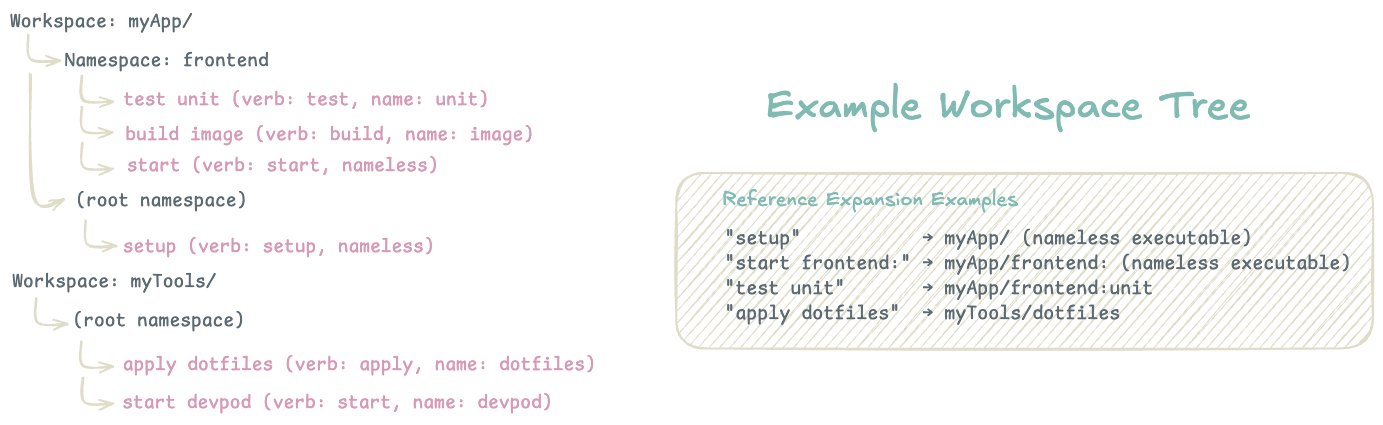
Flow’s organizational system creates a hierarchical structure that scales from individual projects to complex multi-project ecosystems. The system balances discoverability with isolation, enabling both focused work within projects and cross-project composition.
Hierarchy Structure
Workspaces serve as the top-level organizational unit, typically mapping to Git repositories or major project boundaries. Each workspace contains its own configuration, executable discovery rules, and isolated namespace hierarchy.
Namespaces provide logical grouping within workspaces, similar to packages in programming languages. They enable organizational flexibility. A single workspace might have namespaces for frontend, backend, deploy, or tools. Namespaces are optional but recommended for workspaces with many executables.
Executables are the atomic units of automation, uniquely identified within their namespace by their name and verb combination. This allows multiple executables with the same name but different purposes (build api vs deploy api).
Reference System
Flow uses a URI-like reference system for executable identification:
workspace/namespace:name
    │         │       │
    │         │       └─ Executable name (Optional but unique within verb group + namespace)
    │         └───────── Optional namespace grouping
    └─────────────────── Workspace boundary
Reference Resolution Rules:
my-task→ Current workspace, current namespace, name=“my-task”backend:api→ Current workspace, namespace=“backend”, name=“api”project/deploy:prod→ workspace=“project”, namespace=“deploy”, name=“prod”project/→ workspace=“project”, no namespace, nameless executable
Reference Format Trade-offs:
- Chosen: Slightly more verbose for simple cases
- Avoided: Naming collisions, poor tooling support, brittle file/directory coupling
Verb System
Verbs describe the action an executable performs while enabling natural language interaction. Verbs can be organized into semantic groups with aliases:
# Executable definition
verb: build
verbAliases: [compile, package, bundle]
name: my-app

# With the above, all of these commands are equivalent:
flow build my-app
flow compile my-app
flow package my-app
This system allows developers to use whichever verb feels most natural while maintaining executable uniqueness through the [verb group + name] constraint.
I’ve significantly reduced the number of default verb groups to focus on the most common actions with the most semantic clarity. See the flow documentation for the latest default list.
Context Awareness
Flow maintains context awareness to reduce typing and improve ergonomics:
Current Workspace Resolution:
- Dynamic Mode: Automatically detects workspace based on current directory
- Fixed Mode: Uses explicitly set workspace regardless of location
Namespace Scoping:
- Commands inherit current namespace setting
- Explicit namespace references override current context
Note to self: Explicit command overrides of workspace / namespace may become an emerging need with the Desktop UI and MCP server usage.
Cross-Project Composition
The reference system enables powerful cross-project workflows:
executables:
  - verb: deploy
    name: full-stack
    serial:
      execs:
        - ref: "build frontend/"     # Different workspace
        - ref: "build backend:api"   # Different namespace
        - ref: "deploy"              # Current context
Finding the Workspace
Registration is an optimization, not a prerequisite. In dynamic mode flow finds its workspace by
walking up from the current directory to the nearest flow.yaml, the same way make and
bazel find their root. Clone a repo and its executables work immediately.
An unregistered workspace is named after its directory, runs normally, and is never written
anywhere. Not to the config, not to the shared executable cache. What you give up is the ability
to flow workspace switch to it, and other workspaces cannot reference its executables by name.
Resolution runs in this order:
--workspaceor$FLOW_WORKSPACE, which accepts a registered name or a path- The nearest
flow.yamlat or above the working directory (dynamic mode only) - A registered workspace whose directory contains the working directory
- Whatever
flow workspace switchlast set
A directory containing its own flow.yaml is a boundary. The closest one wins, and a parent
workspace does not scan into it. Discovery also walks past vendor/, node_modules/,
third_party/, external/, .git/ and .claude/, because a flow.yaml in there belongs to
that copy rather than to your project. The honest caveat is that there is no stopping point above
your home directory, so a flow.yaml in ~ makes your entire home directory a workspace.
Git Workspaces
A workspace can be a git remote rather than a local path. Clones are cached under
~/.cache/flow/git-workspaces/, following Go module conventions, and can be pinned to a branch
or tag. flow sync --git refreshes them. This is what lets a workspace of shared team
executables be consumed the same way a dependency is.