Info
This page is a public overview of a closed source project. I hope to one day open source it, but for now this is a way to share the architecture and design.
Last updated: August 11, 2025
HubExt is a system that aggregates multiple smart home platforms and protocols into a single API gateway, providing unified device management, automation rules, and scene control across different ecosystems. The architecture handles real-time device synchronization, event processing, and cross-platform automation orchestration powered by flow and an eventual HubExt Dashboard.
Design Philosophy
- Unified Control Plane: Provide a single API for managing devices across multiple smart home platforms.
- Extensible Architecture: Support new platforms and devices through modular integration layers.
- Declarative Automation: Use a rules engine to define automation logic in a platform-agnostic way.
System Architecture
The gateway operates as a centralized control plane that bridges local smart home protocols with cloud services while maintaining responsive local control capabilities.
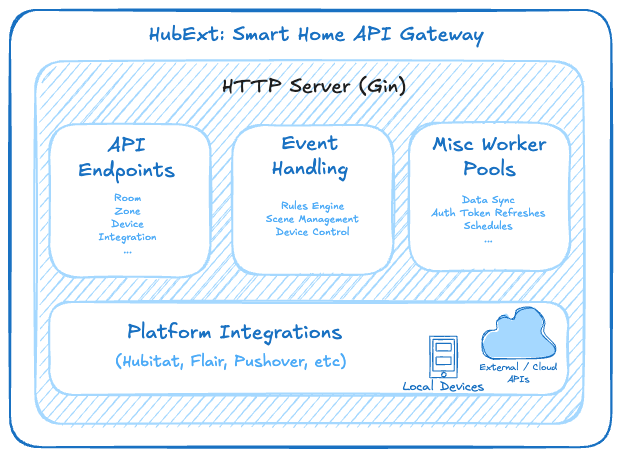
Technical Stack
- Go - Backend Gin API server and core logic
- TypeScript/React - WIP Dashboard for device management and automation configuration
- Flow Powered Workflows - Declarative workflows build on top of the flow platform for observability and management via the CLI and UI
Current Platform Integrations
Hubitat Hub Integration
- Protocol: HTTP REST API using Makers API
- Authentication: Access token with App ID
- Communication: Local network for minimal latency
- Event Handling: Webhook-based real-time device updates
Flair HVAC Integration
- Protocol: OAuth 2.0 REST API with automatic token refresh
- Components: Structures, rooms, HVAC units, sensor bridges
- Capabilities: Mini-split control, room temperature monitoring
Weather Service Integration
- Provider: WeatherAPI.com with API key authentication
- Data Points: Temperature, humidity, conditions, feels-like temperature
- Caching: Local cache with 30-minute refresh intervals
Google Calendar Integration
- Protocol: OAuth 2.0 REST API with automatic token refresh
- Use Case: Event-based automation triggers and conditions
Pushover Notifications
- Protocol: HTTP POST requests to Pushover API
- Use Case: Real-time alerts for device events and automation triggers
AI Integration (WIP)
- Provider: Anthropic API for natural language processing
- Use Case: Natural language automation rule creation and device control
Device Management System
Most of my devices are registered in the Hubitat platform, which provides a local API for device management. I have also been evaluating Home Assistant as a potential alternative for future integrations but have not yet migrated. The core requirements for the device management system include:
- Unified Device Model: Abstract representation of devices across platforms
- Capability-Based Architecture: Devices expose capabilities like switches, sensors, and thermostats
- Room Organization: Devices are grouped by rooms with hierarchical structure
Device states are synchronized into local cache storage, providing fast API responses while maintaining eventual consistency with upstream platforms.
Abstract Device Interface
All devices implement a common interface to ensure consistent interaction across platforms:
type Device interface {
  ID() string
	Name() string
	Room() room.Room
	MatchesName(string) bool
	Capabilities() []CapabilityName
	As(CapabilityName) Capability
}
This interface is implemented for each platform / device type once and reused across the system. It allows for flexible device management and interaction without needing to know the underlying platform details.
Capability-Based Controls
Devices expose capabilities that define their functionality, allowing for flexible control and automation. For instance:
- Switch capabilities for on/off control
- Sensor capabilities for environmental data
- Thermostat capabilities for HVAC control
- Button capabilities for trigger events
type Capability interface {
	Name() CapabilityName
	IsStateful() bool
	CurrentState() CapabilityState
	Merge(Capability)
	SendCommand(string) error
}
Room Organization
type Room struct {
	Name    string   `json:"name,omitempty"`
	Aliases []string `json:"aliases,omitempty"`
	Groups  []Group  `json:"groups,omitempty"`
	Rank    uint     `json:"rank,omitempty"`
}
- Hierarchical room structure with groups and aliases
- Device-to-room mapping for contextual automation
- Room-based filtering and bulk operations functionality
Automation Engine
Event Processing
- Device state change triggers webhook OR data sync causes event generation
- Event parsed and validated
- Matching rules evaluated
- Actions executed across relevant platforms
- Results logged and metrics updated
Rules Engine
Event-driven automation with logic defined in Go handlers.
type Rule struct {
	Name       string
	Aliases    []string
	HandleFunc Handler
}

type Handler func(Event, room.List, device.List) (handled bool, err error)
The handle function is responsible for processing events and executing actions based on the rule’s logic. At the moment, all events flow through all rule handlers so they must handle filtering. Some smarter filter logic would be nice to have here but is unecessary at the current scale.
Note
The rules engine design is still a work in progress. The goal is to provide a seamless integration with external rules engines via the platform integrations but those aren’t consistently exposed. The cufrrent implementation is a basic event-driven system that evaluates rules based on device state changes and executes actions across platforms but the definition can be streamlined further.
Scene Management
Scenes follow a similar structure to rules but are predefined automation scenarios that coordinate multiple devices across platforms.
When defined in Go, the handler function is responsible for executing the scene by sending commands to the relevant devices.
func pbChillHandler(_ room.List, curDevices device.List) (bool, error) {
	tableLamp := curDevices.GetDevice(registry.PrimaryBedroomTableLamp)
	ceilingLight := curDevices.GetDevice(registry.PrimaryBedroomCeilingLight)

	switch {
	case timeframe.CurrentDay().IsWeekday() && timeframe.Night().CurTimeInFrame():
		if err := tableLamp.As(device.SwitchName).SendCommand(device.OnCommand); err != nil {
			return false, err
		}
		if err := ceilingLight.As(device.SwitchName).SendCommand(device.OffCommand); err != nil {
			return false, err
		}
		return true, nil
	default:
		return false, nil
	}
}
This currently feels a bit clunky, the end goal is to get to a point where these can be defined in simple YAML like:
scenes:
  PBRChill:
    devices:
      - room: "primary_bedroom"
        type: "switch"
        action: "dim_to_30"
      - room: "primary_bedroom"
        type: "hvac"
        action: "cool_to_68"
    window: "weekday night"