I’ve been thinking a lot about developer tooling and the idea of a “personal developer platform” - something that I could adapt to aid how I want to develop. Modern development can feel like tool chaos at times - we’re juggling package managers, test runners, linters, deployment scripts, language-specific tooling, and dozens of open source CLI tools. Each project accumulates its own collection of scripts and commands that live in different places with different interfaces.
I introduced flow in another post a few months ago, but I’ve had the amazing opportunity to start a sabbatical at the Recurse Center, where I’ve been able to think more deeply about the problems I was solving and the technologies I wanted to learn about! As I mentioned in that post, flow has been my “learning platform” over the last 2 years and I knew I wanted to take it a step further at Recurse.
I’m at the halfway point of my time at RC and am excited to share how my first 6 weeks have been on my main coding project.
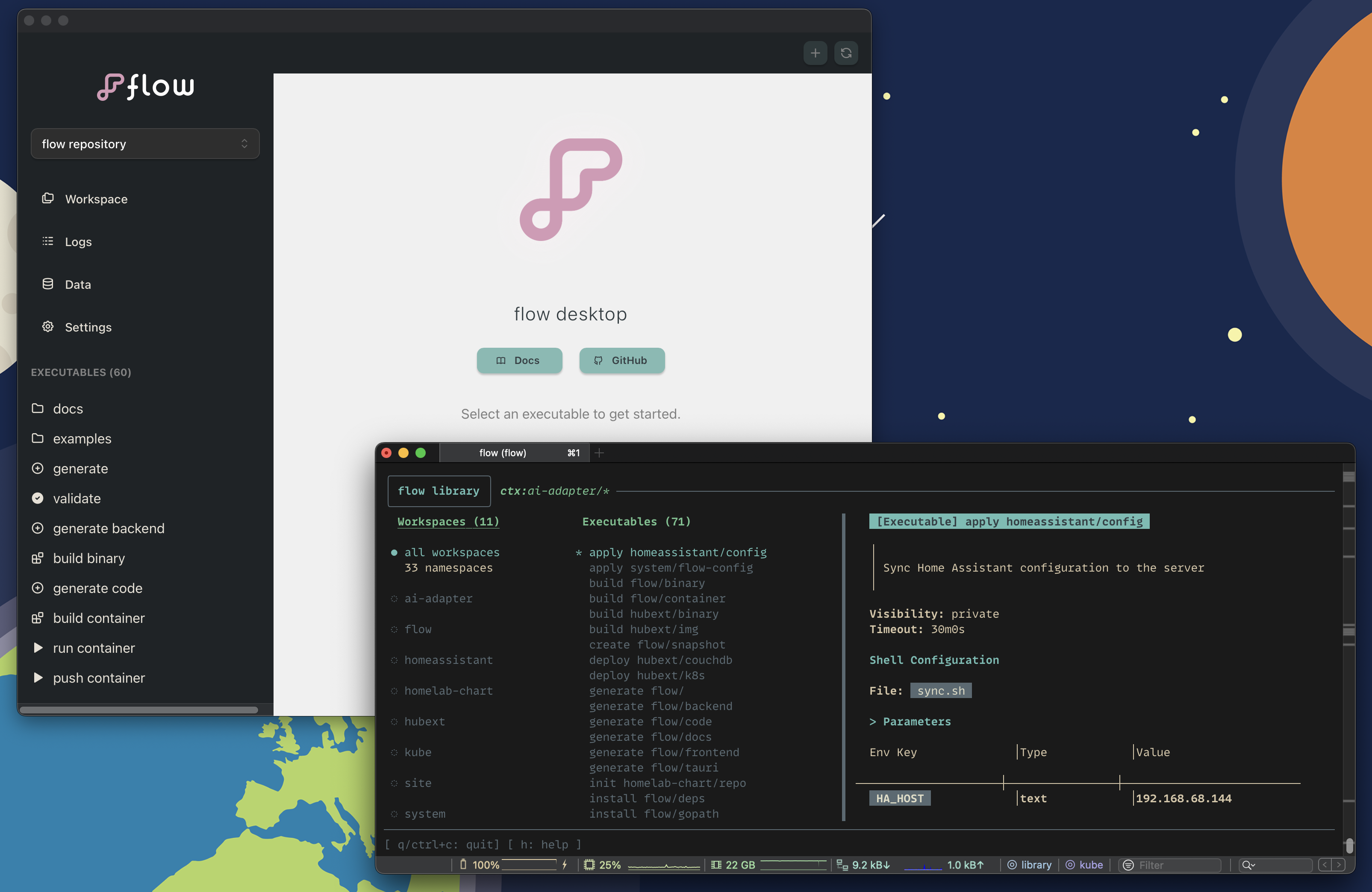
flow desktop
I’ve been itching to work on a frontend project for a while now. While building the flow TUI library, I had lots of fun thinking about how I could create a good experience through visuals and layout. Bubble Tea has been fun to use here, but I’ve wanted to do some UI development with more possibilities. Doing this in the “browser” and using new-to-me technologies sounded like a great plan.
Coming into RC, this was something I knew I wanted to work on, but my excitement grew as I started to learn about the fascinating world of frontend development through RC pair programming, events, and chats.
Architecture Decision: CLI as Single Source of Truth
Instead of duplicating business logic in my desktop app, I’ve been building it as a pure visualization layer over the existing CLI.
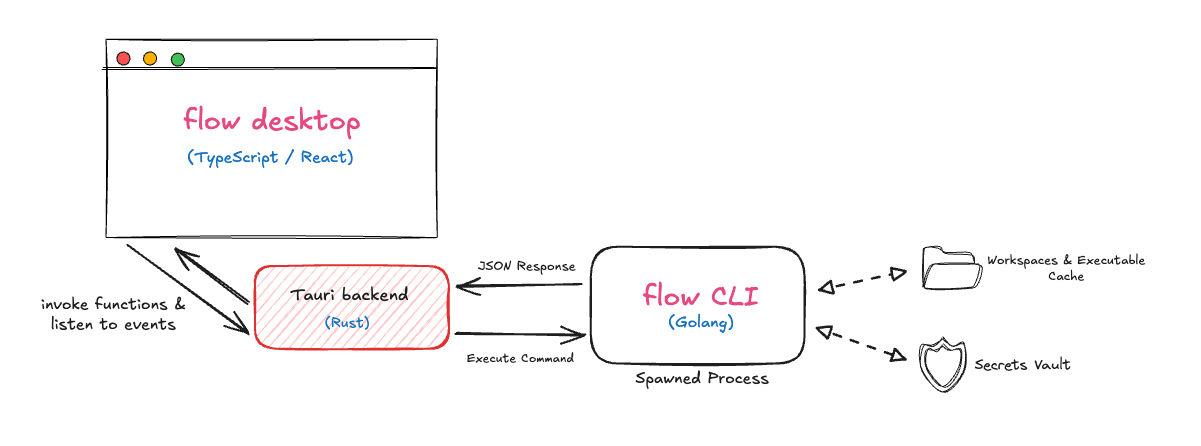
This felt risky at first - wouldn’t spawning processes be too slow? Turns out CLI commands execute pretty fast thanks to some caching I do on the CLI side. The whole round trip feels instant with my current usage.
Tech Stack
All of the resources, pairing, feedback, and individual research I’ve done has landed me on the following:
- Tauri: Gives me Rust backend + web frontend without Electron’s bloat. Bonus that it’s an opportunity to learn some Rust.
- TypeScript: I was able to get TS and Rust types generated from the same JSON schema that I use to generate Go code. This has been making development much smoother across the 3 languages that flow now uses.
- React & Mantine UI: VSCode-like components without building everything from scratch. Their Spotlight extension is what sold me - it could be a really cool search and command center for the UI!
Demo!
Here is a quick demo of me using my current implementation of the desktop. This shows the workspace and executable viewer/runner in action - you can see me running an executable directly from the UI and playing with the theme picker I prototyped for customization.
I still have more work to do here, but it’s been satisfying seeing my ideas come to life as I pick up these new technologies.
vaults v2
I had a couple of pain points with the vault that I initially built for flow. The UX was pretty simple but limiting. I’ve also been really wanting a way to integrate my Bitwarden secrets into flow seamlessly. This led me to brainstorm a new design for that feature. I spent my first 2 weeks at RC doing some light research on cryptography with Go, studying how other tools handle secrets, and building a simple POC.
I decided to introduce a “provider” concept that also improves the experience around having multiple vaults. I currently have an implementation for an updated version of my AES symmetrically encrypted vault, added an Age asymmetric encryption backend, and plan to add a backend for custom CLI-tool vault managers. You can see what I came up with in this repo. From the flow perspective, the experience would be like this:
Creating a vault
# Auto-generates everything for the AES vault
flow vault create development
# Create an Age vault with identity generated from age-keygen
flow vault create team --type age --recipients key1,key2,key3 --identityFile id.txt
# External needs CLI integration
flow vault create bitwarden --type external --interactive
Vault Switching as Primary UX
Borrowed the mental model from git/kubectl:
flow vault switch development    # Like git checkout
flow secret set api-key "dev-123"

flow vault switch production
flow secret set api-key "prod-456"
This allows for clean secret references in executables: secretRef: "api-key" uses current vault, secretRef: "production/api-key" is explicit.
Technical decisions
Executable composition
Executables aren’t just scripts - they’re composable units with conditional logic:
serial:
  failFast: true
  execs:
    - if: os == "darwin"
      cmd: "command -v mytool || brew install mytool"
    - if: env["PUSH"] == "true"
      cmd: make image
    - ref: deploy development
      reviewRequired: true  # Pauses for human confirmation
    - ref: launch app
The expression language (using Expr) has access to OS info, environment variables, and flow’s cache. It’s like having bash conditionals but declarative.
Process architecture
The desktop app’s process model is pretty simple. Each user action spawns a CLI process:
#[tauri::command]
async fn get_workspaces() -> Result<Vec<Workspace>, String> {
    let output = Command::new("flow")
        .args(["workspace", "list", "--output", "json"])
        .output().await?;

    serde_json::from_slice(&output.stdout)
}
This seems inefficient but has huge benefits:
- Desktop crashes don’t corrupt CLI state
- CLI updates immediately benefit desktop
- No state synchronization between processes
- Easy to debug - each operation is a discrete CLI command
RC moments that shaped the code
Pair Programming: I paired on setting up Tauri and trying to integrate it with the CLI. We came up with the great idea of using some of my existing CLI output formatting options to get data through the app. This turned out to be a great decision to make on the fly. Conversations with others helped me confirm that CLI-as-source-of-truth wasn’t a compromise - it was the right abstraction.
The Feedback Loop: RC’s culture of sharing work-in-progress meant getting feedback on half-baked ideas. I’ve enjoyed presenting and demoing my progress throughout my time. I’d thought extensions would be a neat feature but I never actually needed them myself. Hearing about the different ways that others think flow could be extended convinced me to reopen an issue I closed.
Community Inspiration: Seeing the variety of projects and approaches at RC has reinforced my belief that developer tools should be adaptable rather than prescriptive. Everyone has their own workflow, and the best tools are the ones that bend to fit how you think, not the other way around.
Next up
flow MCP server
I’ve started using Claude Code and this has inspired me to learn how to create a Model Context Protocol server that will allow AI to understand flow workspaces and executables natively. I’d love to eventually have something that enables:
- Browsing flow files and suggesting syntax improvements
- Generating new workflows from natural language
- Debugging failures with full workspace context 🚀
WASM plugin system
Extending flow with WASM-integrated extensions. I want to try to allow automations to be programmable in two ways:
- Executable template generator: Plugins that run template generation for flow-discoverable executables (from APIs, templates, external sources). I’m thinking of something like Taskfile/just → flow executable integrations to start
- WASM Runtime executable type: Plugin executables that run sandboxed through flow
This will be my first time getting hands-on with WebAssembly and I already have many ideas for cool plugins that will allow me to tinker with a variety of languages in the future.
Test & release improvements
The best way to try out some of these new and upcoming features would be to clone the flow repo and run the build binary executable to get a local go build. Note that the main branch is not guaranteed to be stable, though.
With a new component in the flow ecosystem, I need to level up the test and release process as I prepare for v1 over the next couple of months. This means learning frontend testing practices, updating my GitHub workflows to handle multi-language builds, and rethinking the installation process to bundle the desktop app alongside the CLI.